Pending Changes
Pending changes icons are displayed when updates have been made in the system but have not yet been delivered to a device. These icons are displayed in both the online interface and the Zentra Mobile App.
Hover over the icon to see how many pending changes there are.
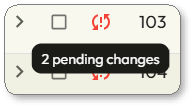
Click  to see the specific pending changes.
to see the specific pending changes.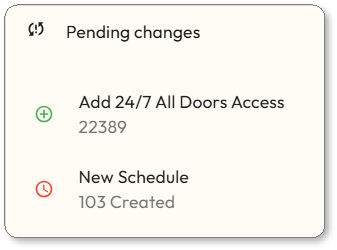
Pending Changes Icons
Pending Changes icons are displayed next to devices that need to be sync'd.
Pending changes icons are displayed only on sites that have Enhanced Access Management enabled.
Description | Icon | Cause | Action to Resolve |
|---|---|---|---|
Initial Setup | |||
Sync for Enhanced Access Management |  | Enhanced Access Management enabled on existing site, or Engage site imported | BLE sync Wi-Fi sync |
Rule Cleanup Required | | Engage import detected constraint violations (too many schedules or device rule assignments) | Manual cleanup by Property Staff, then BLE Sync Wi-Fi sync |
Access Changes at the device | |||
New Schedule / Updated Schedule / Deleted Schedule | | Weekly access rule created, modified, or deleted Weekly access rule expired | BLE sync only Wi-Fi sync only No Tour programming blocked on the device until these clears |
Access Changes for a user | |||
Add Access |  | New physical credential created User added to user group Access rule created or modified to grant access User assigned to rule | No Tour programming BLE sync Wi-Fi sync |
Remove & Block | | Credential deactivated, marked lost or stolen User removed from group Access rule deleted or modified to remove access User unassigned from rule User account deactivated | No Tour programming BLE sync Wi-Fi sync |
Add 24/7 All Doors Access | | 24/7 Access to All Doors toggle turned ON for a user | No Tour programming BLE sync Wi-Fi sync |
Remove & Block 24/7 All Doors Access | | 24/7 Access to All Doors toggle turned OFF for a user | All blocks will remain on the UI until a sync is performed, but blocks will be programmed when they can be. BLE sync Wi-Fi sync |
Update Special Properties | | Pass Through, Toggle Unlock, ADA Relock Delay, or Time Limit changed on an existing credential | No Tour programming BLE sync Wi-Fi sync |
Update Special Properties | | Force Check-in property changed on an existing credential | BLE sync only Wi-Fi sync only This cannot be No Tour programmed |
Pending changes apply only for no-tour supported devices and user access. Online/connected devices are updated in real time, so pending updates won't be seen for these.