User Search and Filters
- Navigate toPeople > Everyone.
- Near the top of the screen will be a search bar and filter options.

Search
can be used to find a User by name.Filter Users
- Click any drop-down from the bar, and then select check boxes to filter users.
- ClickSaveto apply the filter.
- ClickClearto remove all filters for the selected category.
Show columns and save filters
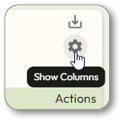
On the far right of the screen, click the gear icon to display the
Show Columns
menu.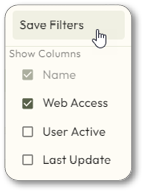
Save Filters
button to save the filter selections as the default.The Web Access filter options (No, Pending, Yes) include users assigned the Resident permission profile under “Yes.” Since Resident users receive web access solely to enable mobile credentials and cannot log into the Zentra web app, the “Yes” filter will include both functional web-access users and Resident-only users. To identify users with functional web-access, review User permission profiles individually.