Scheduled Reports
In addition to on demand reports, you also have the ability to schedule reports to be sent by email on the days and times configured.
You can schedule the following types of reports:
- History
- Users and User Groups
- Access Points and Access Point Groups
- User Attendance and Group Attendance
- User Permissions and Group Permissions
To create a scheduled report:
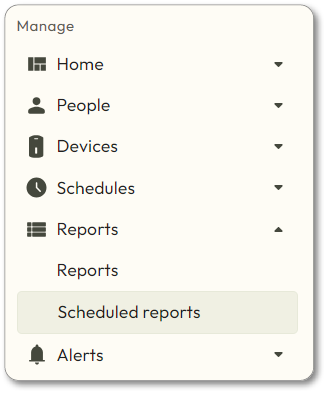
- Navigate toReports>Scheduled Reports:
- Hover over
 and choose Create Scheduled Report.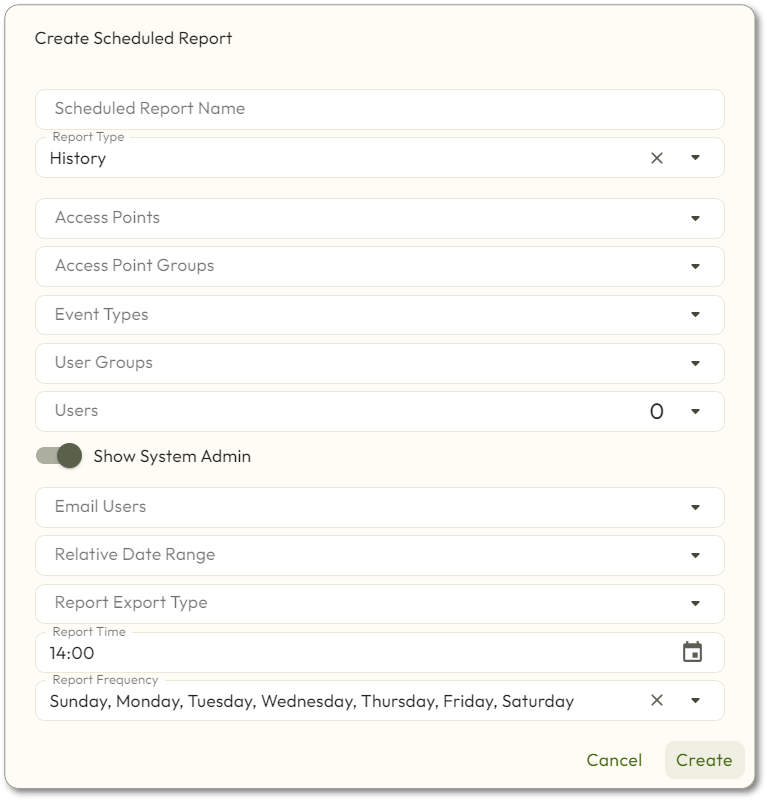
- Enter/select the following:
- Scheduled Report Name: Name of the Scheduled Report
- Report Type:
- Access Point Groups
- Access Points
- History
- User Attendance
- User Group Attendance
- User Group Permissions
- User Groups
- User Permissions
- Users
- The remaining options will change depending on what type of report you choose. Select the desired options.
- Choose which users to email the report to in theEmail Usersdrop-down.
- Choose theReport Export Type,Report Time, andReport Frequencyfrom the drop-down menus.
- ClickCreate.