Calculate Credential Bitmask
- Present an unenrolled badge to a reader.
- The badge must beunenrolledand get rejected. You should see aDecline Badge Not FoundEvent with the nameSystem Adminin the history.
- The badge data will remain in the system for 15 minutes or until another unenrolled credential is presented to this reader.
- Navigate toSettings > Credential.
- From theDevicedrop-down list, select the reader to which the unenrolled badge was presented. Then clickCalculate.
- The “Badge ID” column will populate. If one of these numbers matches what is printed on the badge, this is the Bitmask that should be set on the readers.
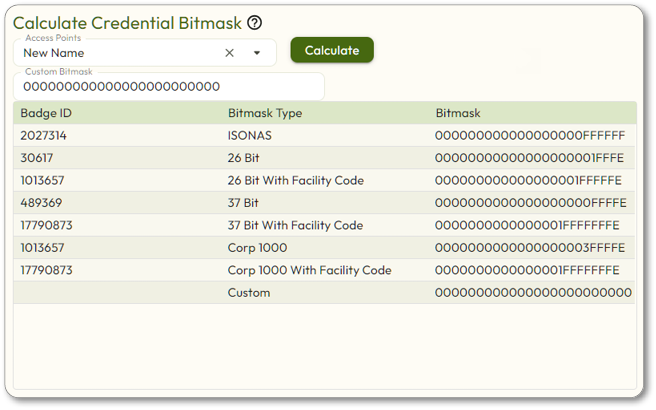
If there is in step 4, you will either need to calculate a custom Bitmask in order to manually enroll these credentials or you are using a high frequency credential and will need to enroll them by presentation.
no matching badge ID