Manage Schlage Control Access Configuration
Overview
The
Manage Schlage Control Access Configuration
feature streamlines the setup process for Schlage locks, ensuring that necessary access configurations are automatically applied upon commissioning. This setup allows immediate user access without requiring a database sync.Enabling the Feature
Ensure that the
Manage Schlage Control Access Configuration
is activated in the Global Settings before commissioning the lock.- Navigate to theSettingssection by clicking the gear icon in the lower left of the screen.
- Ensure theManage Schlage Control Access Configurationslider is selected.
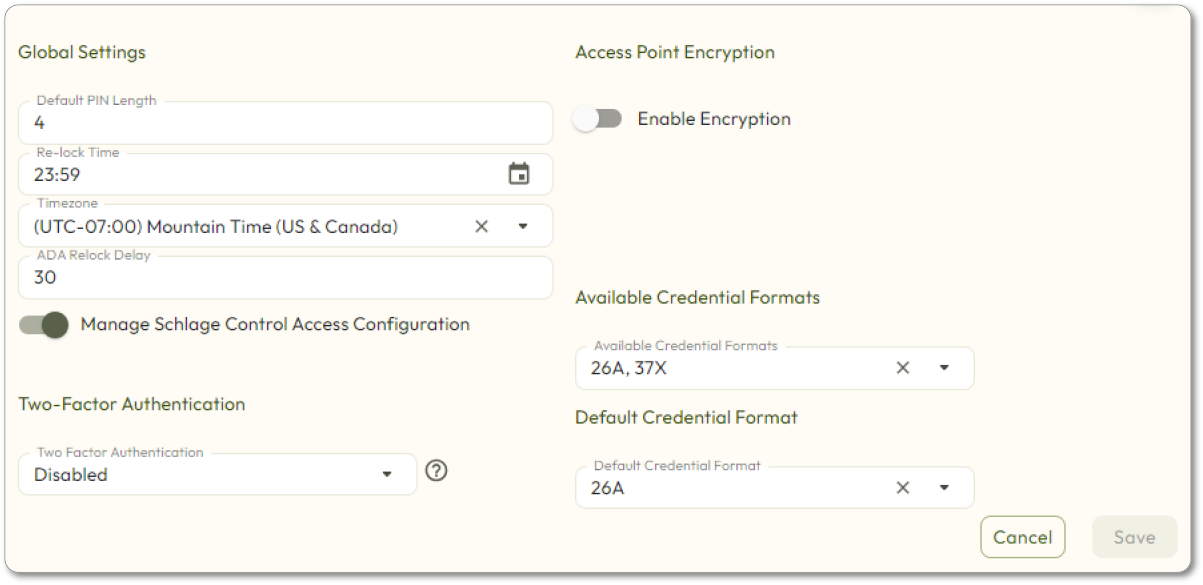
- Click theSavebutton, if necessary.
Offline Devices are automatically assigned:
- A new user group named after the lock
- A 24/7 access rule specific to that lock
Supported Devices
- Schlage Control Lock
- NDEB
- LEB
- XE360
Devices must have a BLE connection to function with Zentra. Note that NDE is not supported in offline mode.
Use Case Example
For example, when setting up a Control lock for Apartment 101, the resident will be added to the user group, granting them 24/7 access to their apartment.
Additional Notes