IP-Bridge Status Light Indicators
The IP-Bridge has multiple LED status indicators to assist in monitoring and troubleshooting the status of the unit. LED’s are labeled below.
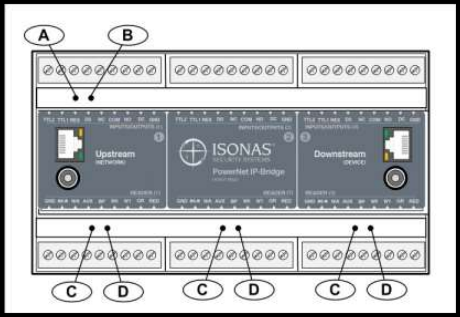
LED’s A and B are used to indicate the status of the IP-Bridge itself.
The C & D LED pairs indicate the status of individual doors.
IP-Bridge Status | LED “A” Color | LED “B” Color |
|---|---|---|
IP-Bridge is not powered on | Off | Off |
Power Turned On – Waiting in Boot Loader mode (~10 sec) | Red | Red |
Performing All IP work, all mode, duration depends on settings | Amber | Red |
IP Work completed (except long DNS lookups), ports/DNS | Red | Amber |
Startup Complete – Errors reported | Green | Amber |
Startup Complete – No issues reported | Green | Off |
IP-Bridge is on and in a normal state | Green | Green |
Dynamic IP lease expired on the network but the IP-Bridge did NOT release it’s IP-Address. Note: Set the IP-Bridge to Static, and reserve an IP by MAC address in the router settings. | Green | Red |
DNS look up did not find a host | Green | Red |
Door Status | LED “C” Color | LED “D” Color |
|---|---|---|
No Door (2-door Bridge)/Deactivated Door | Off | Off |
Door is locked (Normal Operation) | Red | Off |
Door is unlocked | Green | Green |
Door is toggle unlocked | Green | Green |
Door is unlocked for the latch interval | Green | Off |
Door is in the Lockdown state | Red | Red |
Waiting in Startup or Performing Boot Load | Amber | Amber |
Waiting to be activated or door process issue | Off | Amber |
Device is not responding – power cycle the device | Ambers | Amber |