Why Use Areas?
Overview
A site may have certain administrators who need to see/administer
some
doors for their building or local area, but not others. These administrators would be assigned to the area(s) with which they require “View” or “Manage” privileges within the site and will not
be able to view or manage any object (group, access point, user, schedule, etc.) that is associated with the area(s) of which they are not
assigned.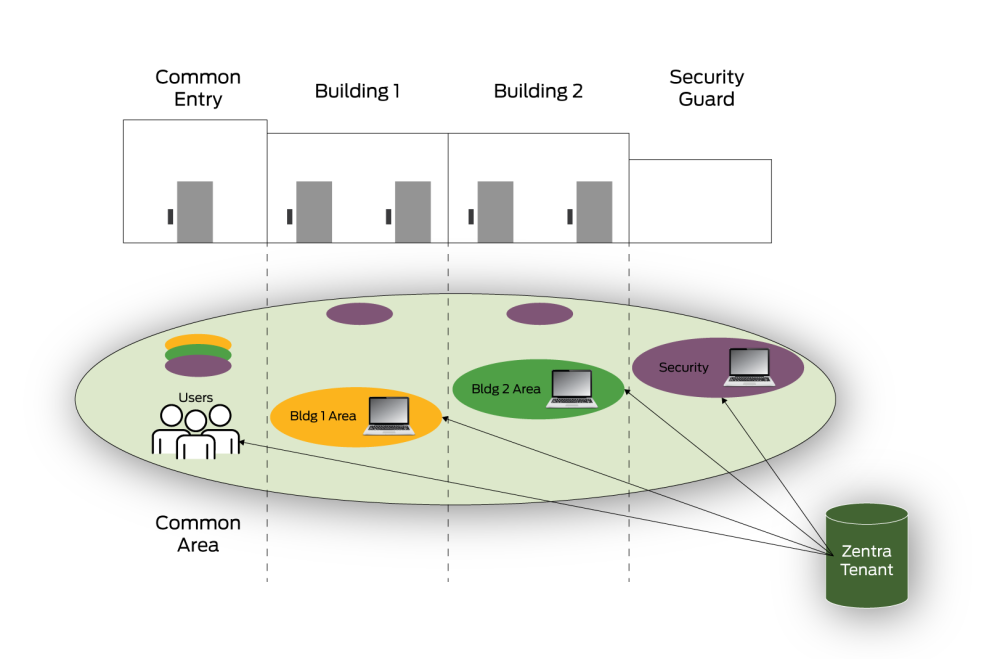
In the graphic above, you can see a situation where the use of areas might be helpful in segmenting the administrative privileges of the site.
Note that areas are most useful in larger, more complex configurations where different web access users need to manage
distinct groups of access points
within the same site.
In the above scenario:
- There is a common entry that all badge holders in the site would have access to.
- Separate areas are created forBuilding 1andBuilding 2so that the web access user(s) with administrative privileges forBuilding 1cannot see or make unauthorized changes forBuilding 2and vice-versa.
- The security guards have rights to all areas within this Zentra site so they would be able to administer ALL access points, users, groups, dashboards, rules, etc.
A common reason to use areas would be to split up a site that contains buildings, especially in different time zones.