Update Access
On the
My Access
screen, the Update access
button is displayed for devices where a User is assigned access. The Update access
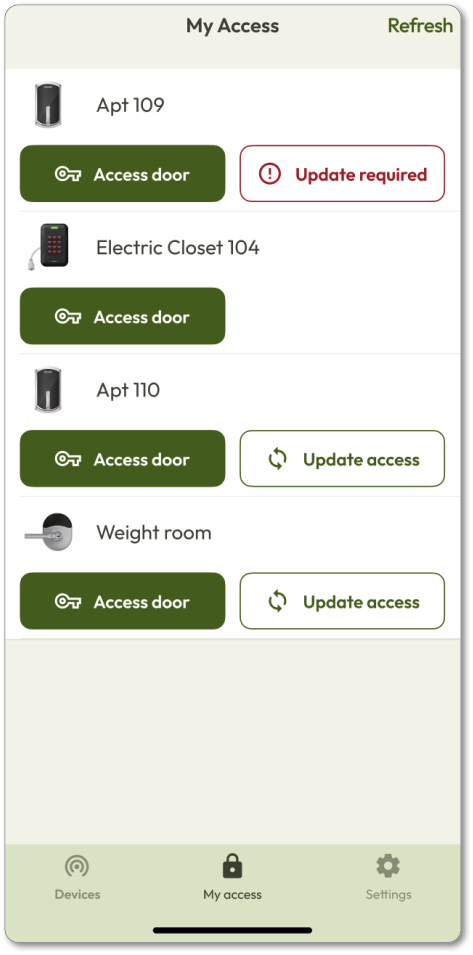
operation applies all credential and schedule changes, guaranteeing the lock is up-to-date. When a change has occurred, this button will change text to Update required
(shown for Apt 109 in screenshot below). - PressUpdate requiredto update the lock.
- Stay close to the lock until the operation is complete.
The
Update access
feature is available beginning with mobile application version 1.5.1. Please ensure your app is updated to take advantage of this feature. Update access
applies to offline and wireless locks: Schlage Control, NDE, LE, and XE360. Online devices Schlage RC and IP Bridge will not show this option, as changes can be pushed in real-time via a Compile operation. This is shown for Electric closet 104
in the screenshot above. This functionality is intentionally excluded from CTEs. When a User is trying to get through a Door, they are physically at the MTB — not the CTE. BLE range is limited, and the CTE could be hundreds of feet away. A BLE sync to the CTE from that position would be unreliable or impossible.