Wireless Device Check-In
The Schlage NDE and LE wireless locks rely on batteries for power and periodic updates over WiFi, or
Check-In
to communicate with Zentra.The CTE while it is powered by ethernet, it still gets periodic updates over WiFi or or
Check-In
to communicate with Zentra. Since it does not rely on battery life, it can be configured to check in more regularly (default every 15 mins). Battery life
The battery life of wireless devices is affected by two main variables:
- How frequently credentials are presented to the device
- How frequently the device checks in with Zentra
By default, wireless devices will check in with Zentra once every 24 hours. This frequency is used to determine the battery life graphs in the following charts:
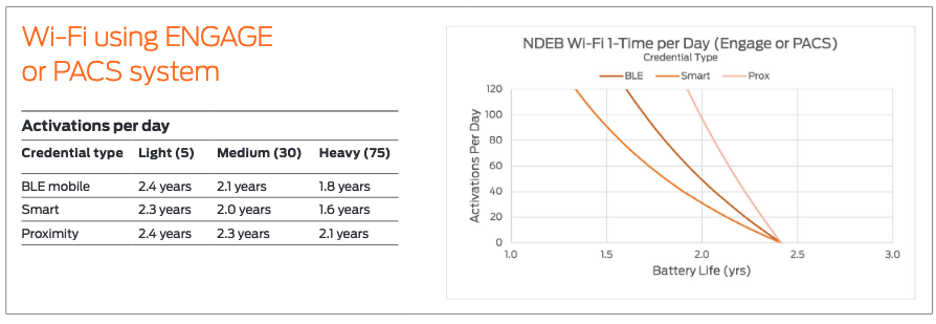
Zentra also allows end users to configure the devices’ check-in frequency and schedule in the device settings. This check-in frequency has a predictable and direct effect on battery life. Having a device check in via Wi-Fi twice per day (or every 12 hours) will result in approximately half the expected battery lifetime (i.e. 1 year instead of 2 years) than the default once-per-day setting.
When a device check-in occurs, the device receives updated device settings and access control configuration
from
Zentra and provides activity history to
ZentraOutside of specific user interaction, there is only one scenario in which the device will check-in to Zentra outside what has been configured within Zentra. If alerts are enabled for the site, WiFi locks will check-in and report alert information when certain alert conditions are met, including:
- (unauthorized access)
- (device, reader, or magnetic tampering – magnetic tamper is NDE only)
- (may not callout until after battery replacement)
- (note: while logged in history, WiFi callouts may not occur reliably)
- events (activated or stuck condition)
Important:
WiFi locks do NOT check-in for Extended Open or Door Propped alerts. Due to the limited check-in frequency configured to preserve battery life, there may be times that you need to update a device immediately, outside of the normally scheduled recurring check-ins. This process is referred to as a Force Check-In.